
Scratch Damage
A scratched platter is where most labs stop. Using firmware-level bypass techniques, we recover data from scratch damage with roughly 70% success — cases that come to us precisely because others couldn't solve them.
Scratch Lab can recover data even when the platter is scratched
A scratch on the platter — also referred to as "magnetic-layer delamination" or "platter failure" — is a fault that most recovery providers diagnose as unrecoverable. Using specialized techniques, we handle scratch and magnetic-layer delamination across a wide range of manufacturers and models.
What we treat as
"scratch damage"
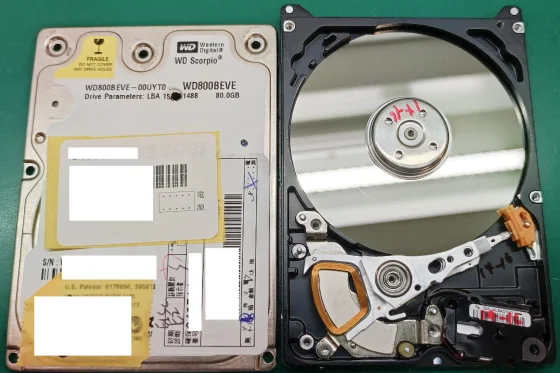
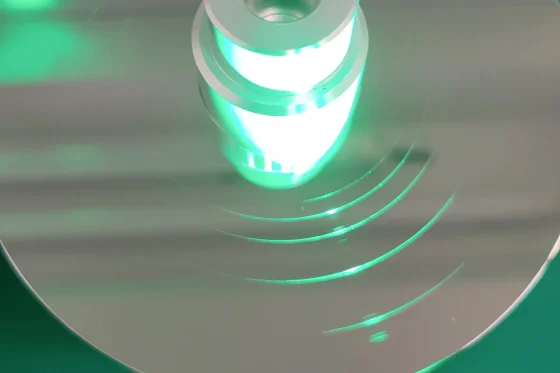
A scratch is damage caused by contact between the head and the platter. Its severity varies widely, from shallow line-like marks to deep, gouged grooves.
We classify as a scratch only what is visible to the naked eye. Microscopic damage that can only be seen under magnification can be handled with a simple head swap, without any special procedure (it appears as nothing more than a read error), so we do not classify it as scratch damage.
Why a scratched HDD
fails to be recognized
Before an HDD can read its recorded data, it generally goes through the following startup sequence. Because the order matters, we refer to these as Step 1–3.

This sequence is critical when diagnosing a failed HDD. The point at which it stalls indicates the likely fault.
- If Step 1 cannot be passedsomething involved in spinning the platter has failed, so a PCB fault, stiction (head adhesion), or motor failure is suspected.
- If Step 2 cannot be passedthis stage involves head operation, so a head failure is suspected.
- If Step 3 cannot be passedthe firmware is not being read correctly, so either the heads or sectors have degraded to the point where the firmware cannot be read, or there is a problem with the firmware itself.
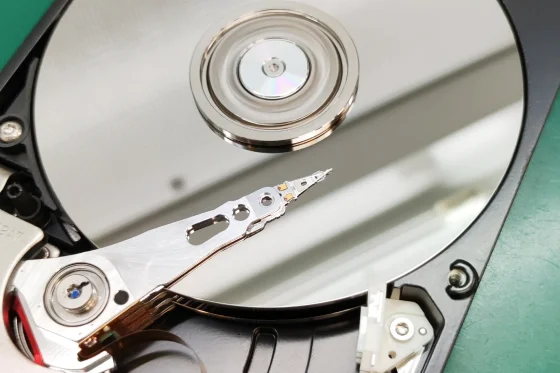
Scratch damage occurs when the head and platter make contact. This contact damages the head, and on the next power-on the drive can no longer complete "the stage where the head tracks its position" (Step 2). This is the state in which the drive makes a repetitive knocking/clicking noise — the head is unable to follow its positional information on the platter and is effectively lost.
You might think, "If the head is broken, just replace it." But the scratch is exactly what makes this difficult. Even with a healthy replacement head, the scratch destroys the new head before it can finish tracking its position. Even if the drive does reach the firmware and start up normally, the head must keep tracking its position for the entire recovery. So if the scratch destroys the head partway through, the head has to be replaced again.
Even after the head problem is solved, one final hurdle remains: reading the firmware (Step 3). The firmware is stored in a dedicated region of the platter called the "system area." A scratch is usually surrounded by fine secondary damage, and this damage causes read errors. If that fine damage — or the scratch itself — reaches the system area, the firmware cannot be read correctly. Again, the drive never reaches the point where data can be read.
The keys to
successful data recovery
Why is data recovery from a scratched HDD so difficult? To even begin extracting data, the following three points must be addressed. Few recovery providers cover all three, which is why scratch damage is generally considered difficult to handle.
1. Removing the dust generated by head-platter contact
When a scratch forms, the head gouges the platter and generates dust inside the HDD. Left in place, this dust not only fouls the head during operation and severely degrades its read performance, but also causes new scratches. This expanding damage can lead to serious consequences, and in some cases makes it impossible to continue the recovery. To prevent this, we have the technology to clean the platter.
2. The technique to get past head position-tracking at startup
For getting past the head position-tracking stage (Step 2 of startup), even providers that claim to handle scratch damage appear to take varied approaches. Some repeatedly swap heads; others burnish or machine the platter. We pass this stage by modifying the firmware.
A single head is responsible for one data-recording surface of the platter. By controlling the firmware, this method excludes the head — on the surface where the scratch exists — from its obligation to track positional information on the platter. The advantage of this method is that, as long as the firmware can be controlled, scratch damage can be handled with a uniform procedure regardless of the severity of the scratch. The disadvantage is that on a drive with fewer platters, a larger share of the total data is lost.
3. The ability to handle firmware faults
As noted above, when scratch damage has occurred, fine damage may also have reached the system area (the firmware-recording region), and concurrent firmware faults are a frequent pattern.
Because we have the technology to address all three of these points, we can handle scratch damage with high reproducibility.
Dealing with a case that others couldn't solve?
Submit it here — diagnosis is free, and we'll tell you exactly what we can and can't recover.
Recovery rate and track record
At the point a scratch is present, most providers return a verdict of "unrecoverable." We, on the other hand, succeed in recovering roughly 70% of cases even when a scratch is present.
- Recovery rate for scratch damage: about 70% (about 80% if limited to the Seagate Grenada family)
- Definition of recovery rate: accepted cases ÷ (accepted cases + unrecoverable cases)
- Period covered: March 2024 to March 2026 (approximately 170 cases handled during this time)
Our method is not a matter of occasionally getting lucky with a head swap. Because we use a highly reproducible technique, we can handle these cases as part of our standard workflow at any time. There are some recent or specific models we cannot handle, but the majority are within our scope.
We also have engineers with an overwhelming volume of experience in handling scratch damage. We receive scratch-damage cases from data recovery providers and repair shops across the country, and we have an extensive track record of recovery — not only from drives with a simple platter scratch, but also from HDDs with concurrent firmware faults. Precisely because we have handled so many cases, we are able to apply the appropriate treatment for each model.
How we differ from providers using the same bypass method
For light scratches, there are likely providers that can handle them with a bypass approach similar to ours. The method itself is by no means unique to us.
The difference is precision. The fact that we actually achieve a recovery rate of around 70% is itself an expression of that difference. What drives that precision comes down to three things:
Depth of firmware understanding
The precision of a bypass depends on the precision of firmware control. Because we understand the underlying mechanism deeply, we can recover even borderline drives that are at the edge of what is possible.
Sheer volume of scratch-damage experience
we have accumulated experience facing a large number of scratch cases, from light to severe.
A refusal to give up
we have recovered data even from difficult cases that ACE Lab's technical support had given up on.
Even when the damage is deep, we do not give up immediately. Even if the prospect is that only 10–20% of the data can be recovered, as long as the customer is willing to accept that outcome, we can continue the work.
Which cases we can
and can't recover
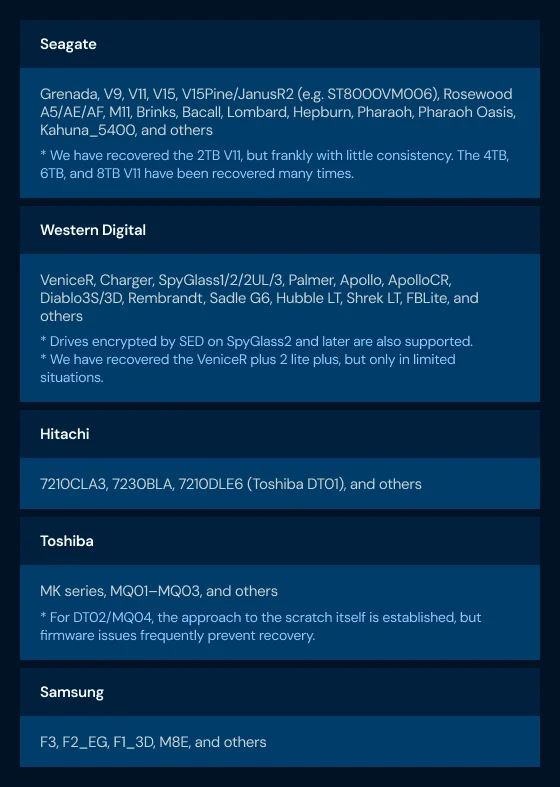
Below is a sample of the families we have recovered to date.
Cases where scratch damage cannot be recovered
This is the reverse of everything above: in the following cases, recovery from scratch damage is unfortunately not possible.
When the firmware cannot be controlled
Getting past head position-tracking at startup requires control of the firmware. Without it, recovery is not possible. Specifically, this applies to helium-filled drives, the very newest HDD models, excessively old models, and rarely circulated models.
When the scratch extends across the entire system area
If a scratch has reached the system area including the backup region, the firmware required to start up cannot be read, so recovery is not possible.
However, for Seagate HDDs, if you can provide a backup of the system-area data, there is a possibility of recovery even when the entire system area is scratched. (This assumes a situation where a backup was taken, but the drive's condition deteriorated and the damage spread before the work could be completed.)
When the unique firmware is corrupted along with its backup
If firmware that is absolutely essential for startup — and unique to each individual HDD — is corrupted, including its backup, the drive will not start up and recovery is not possible.
When the scratch damage has spread too far
Our approach extracts data while avoiding the scratch. As a result, if the damage has spread too far, the data cannot be extracted.
* At present, Toshiba SMR drives can only be handled in limited situations (the approach to the scratch itself is established, but firmware issues often make recovery impossible). In addition, the single-platter HDDs of the Rosewood A5 / V11 cannot be bypassed. For the A5, we have largely established a method. For the single-platter V11, we have recovered data on occasion, but not yet with any consistency.Why a smaller lab can still recover the data
No special equipment required
You may wonder how such a small company can handle scratch damage. The truth is that scratches can be handled with equipment that any standard data recovery provider would already own. No special apparatus is required. What matters is the part that belongs to the engineer — skill, knowledge, and experience.
This is also because we do not take an approach such as burnishing the platter. Burnishing would require dedicated equipment for that purpose. But since we only control the firmware, ordinary data recovery equipment is sufficient.
An extremely high-grade cleanroom is not required either. Of course, working in as clean an environment as possible reduces the risk of head-platter contact, and we naturally carry out all such work in our own in-house ISO Class 5 (formerly Class 100) clean bench. That level is entirely sufficient — it is something even a small company can readily prepare. When a scratch is present, the inside of the HDD is often dirtier than the environment anyway, so a high-grade clean bench or cleanroom is not particularly necessary.
The main gap with the major labs is our smaller stock of donor HDDs — but for most cases, we have the parts we need. We also cannot run a 24-hour operation, and we have fewer engineers than the majors. For time-consuming work such as scratch damage, however, we do not see these as a significant problem.
We do not burnish the platter
Based on the principle that a platter is in its best possible condition in its original state, we do not burnish. We control the head, bypass the area where the scratch is located, and recover the data.
A scratch (media damage) is an irreversible form of damage, and no burnishing technique can recover data from the damaged area. The general purpose of burnishing is to smooth out surface irregularities and thereby prevent secondary damage from contact with the magnetic head. With our proprietary technique, we precisely control the head so that it does not contact the scratched area, so the burnishing step is unnecessary. This avoids the further deterioration of the platter surface that burnishing entails, enabling safer and more accurate data recovery.
A diagnostic service
you can rely on
You can see which files are damaged
When scratch damage has occurred, the location of the scratch must be avoided, so some data loss is unavoidable. Even if some data is recovered, it is hard to feel reassured without knowing which files were recovered and which were not.
That is why we display a recovery status for each file, so it is clear which files were recovered intact, which failed to recover and cannot be opened, and which may be openable but contain errors.
You only pay when you formally request the recovery
As a rule, diagnosis and quotation are free of charge.
That said, in cases requiring advanced procedures beyond the standard treatment for scratch damage, recovery from specialized media, or depending on the circumstances of the recovery, a diagnostic fee may apply. In such cases, we carry out the work only after consulting with you in advance.
It doesn't matter how many labs have tried before
Being asked to take on a case as the third, fourth, or fifth lab in the chain is entirely routine for us, and not something we treat as a problem. Whether the drive has already been opened, and however many providers have worked on it before, makes no difference to how we handle it. Simply ship the drive to us — we will diagnose it free of charge and, with the techniques we have cultivated, do everything we can.
No data, no charge. No matter how many labs have tried.
Send us the case. We diagnose free of charge and give you a clear answer.